Few things disrupt a workday quite like an unexpected call from an unknown number. Is it a delivery driver, a doctor’s office, or another relentless spam operation trying its luck? For Android users, Smart Caller ID: Show & Block has emerged as one popular answer to this daily dilemma, promising to identify callers and filter out nuisance calls before you ever pick up. Developed by H S Apps and launched in mid-2026, the app has already surpassed 1.5 million downloads, suggesting it has struck a nerve with users frustrated by unwanted calls.
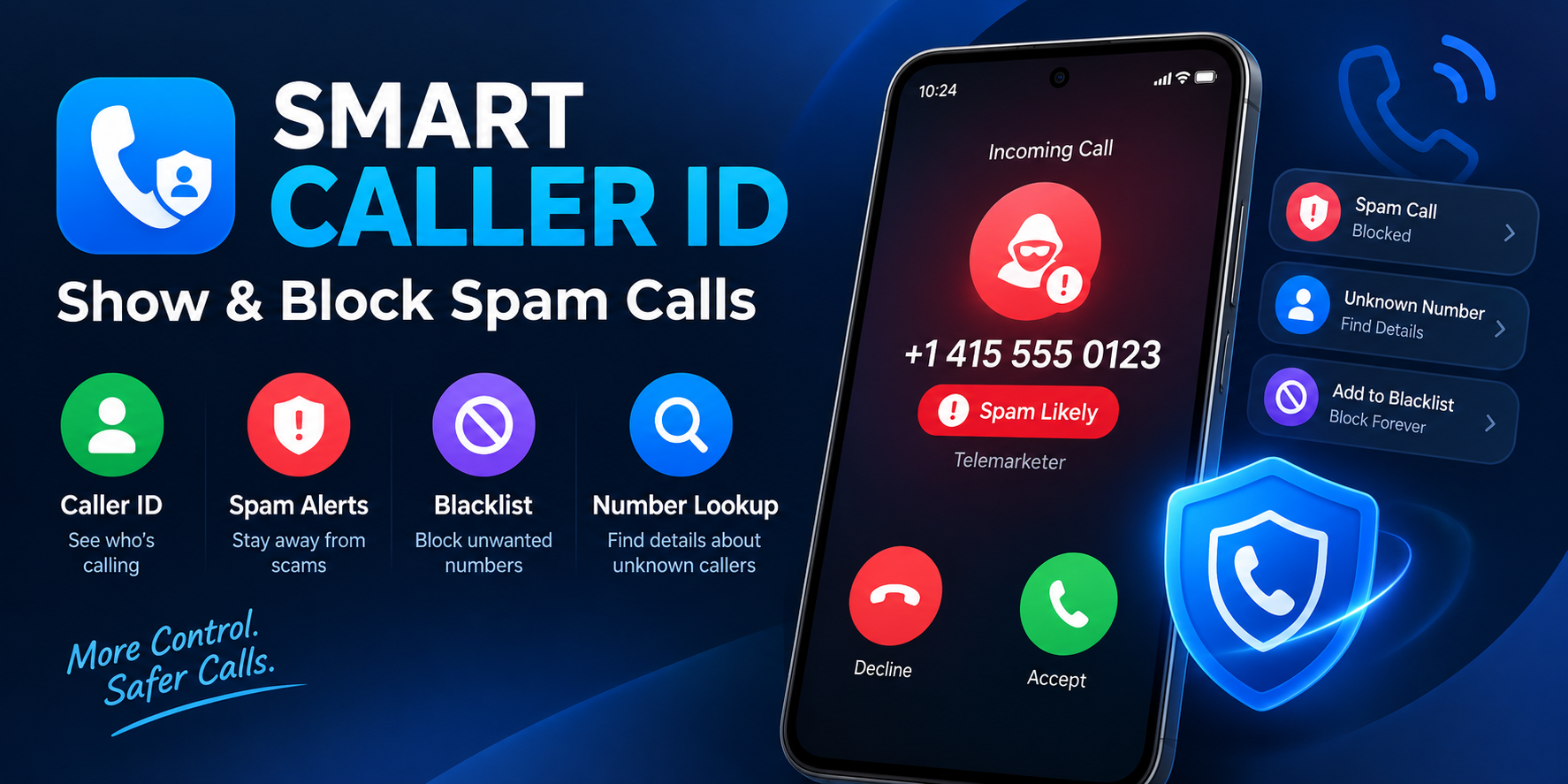
So what exactly does this app bring to the table? At its core, it functions as a communication utility that combines caller identification, spam alerts, contact management, and number lookup into a single interface. The premise is straightforward: give users enough information to decide whether a call is worth their time. Rather than simply blocking everything unknown — a strategy that can backfire when legitimate calls come through — the app aims to inform first. The feature list reflects this balanced approach, offering tools that work in real time as the phone rings.
What the App Offers Users
The feature set here is practical and focused on the moments that matter most — when your phone is ringing and you need to make a quick judgment call. According to the app’s official description, the main capabilities include:
- Caller identification for incoming calls: Unknown numbers are checked and, where possible, identified before you answer.
- Spam alerts: Numbers flagged as potential spam or unwanted calls trigger warnings, helping you avoid scams or telemarketing traps.
- Personal blacklist management: Users can maintain their own list of blocked numbers for complete control over who gets through.
- Number lookup: A search function lets you investigate unknown numbers before calling back, a useful tool for those “missed call” scenarios.
- Search history: Recent lookups are saved for quick reference, so you don’t have to repeat your research.
- Privacy commitment: The app states that your personal contacts remain private and are not shared or sold to third parties.
These features work together to address a common frustration: the feeling of being ambushed by your own phone. By providing context before the conversation begins, the app shifts the power dynamic back toward the user.
The Default App Requirement: A Necessary Trade-off
One aspect of the app that deserves attention is its requirement to be set as the device’s default Caller ID and Spam application. This isn’t a minor technical detail — it’s central to how the app functions. Without this default designation, the app cannot access the system events it needs to identify calls in real time. In other words, the app simply cannot do its job unless Android grants it that level of system integration.
This requirement raises an important consideration for potential users. Setting a third-party app as your default caller ID provider means trusting it with a significant amount of system-level access. The developer is transparent about this trade-off, but users should weigh the convenience against the level of access being granted. For those who regularly deal with spam calls, the trade-off may well be worth it. For others, the requirement might feel like too much to hand over to a third-party utility.
Understanding the Permission Requests
The permissions this app requests are extensive, which is typical for caller ID applications but still worth examining carefully. The developer discloses that the app requires permissions including READ_CONTACTS, WRITE_CONTACTS, READ_CALL_LOG, READ_PHONE_STATE, CALL_PHONE, ANSWER_PHONE_CALLS, and MANAGE_OWN_CALLS. These support the core caller information, contact handling, and call-related features you’d expect from such an app.
Additional permissions include FOREGROUND_SERVICE and FOREGROUND_SERVICE_PHONE_CALL to maintain active call services, POST_NOTIFICATIONS for alerts, ACCESS_NETWORK_STATE for connectivity, and SYSTEM_ALERT_WINDOW for displaying call-related overlays. The developer states these permissions are used only for app functionality and in accordance with platform policies. The breadth of access is a reminder that caller ID apps occupy a sensitive position on your device — they touch your contacts, your call history, and your ongoing calls. Users should read the disclosure carefully and decide whether the convenience justifies the access.
Privacy and Data Practices
The app’s privacy policy and data safety disclosures reveal a nuanced picture. On one hand, the developer states that personal contacts are not shared or sold to third parties — a reassuring commitment given the sensitive nature of contact data. On the other hand, the Google Play listing indicates that the app may share certain data types with third parties, including app information, performance data, and device ID or other identifiers. The app may also collect contacts, app activity, and other data categories.
This doesn’t necessarily mean the app is doing anything improper — many free apps rely on advertising or analytics partners to sustain themselves, and the app does contain ads. But it does mean users should approach with clear eyes. The statement that data “cannot be deleted” is particularly worth noting, as it suggests that once data is collected, there may be no mechanism to remove it. Privacy-conscious users may want to weigh these practices against the app’s utility.
A Rapid Rise with Room to Grow
The app’s growth trajectory has been remarkable. Launched in June 2026, it reached over 1 million downloads within a few months and is currently averaging around 33,000 downloads per day. It has ranked in the top 100 communication apps in several countries, including Portugal, Brazil, Saudi Arabia, and India. For a relatively new entrant in a crowded category, that kind of adoption signals genuine user demand.
However, the app’s reputation is still forming. As of the available data, it has no user ratings on major tracking platforms, which makes it difficult to gauge satisfaction levels from a broad user base. One user review on AppBrain is decidedly negative, accusing the app of being a scam and asking for money before doing anything. This is a single data point and should not be treated as representative, but it highlights the importance of user feedback as the app matures. The developer has been releasing updates frequently — roughly every nine days — which suggests active maintenance and a willingness to iterate.
Who Should Consider This App?
Smart Caller ID: Show & Block is clearly aimed at Android users who feel overwhelmed by unwanted calls. If you find yourself hesitating every time an unknown number appears on your screen, or if you’ve been burned by spam calls before, the app’s core features address a real pain point. The number lookup and search history functions are particularly useful for people who receive frequent calls from unfamiliar area codes or business numbers.
That said, the app isn’t for everyone. Users who are uncomfortable granting extensive permissions to a third-party app, or who prefer to keep their default caller ID as the stock Android system, may find the requirements too intrusive. And anyone who expects a polished, fully mature product might want to wait until more user reviews accumulate. The app is free to download and ad-supported, so trying it carries no financial risk — but the data access it requests is a different kind of investment.
Final Thoughts
Smart Caller ID: Show & Block occupies a useful niche in the Android ecosystem: a free, feature-rich tool for managing the constant barrage of unknown calls. Its developer has been upfront about the permissions required and the default app setting, which is more than some apps do. The growth numbers suggest it’s solving a problem for a lot of people. At the same time, the lack of ratings and the cautionary user review serve as reminders that any app with this level of system access deserves scrutiny. For users willing to make the trade-offs, it may well become a quiet but indispensable part of their daily phone routine.